Website Maintenance Contract: What Must It Cover in 2026?
A complete website maintenance contract covers six areas: technical updates, tested backups, security, 24/7 monitoring, support with quantified SLAs, and an exit clause. Demand written response times (1 hour for a site that is down), ownership of your code, and free return of all access credentials when the contract ends. Without these clauses, do not sign.

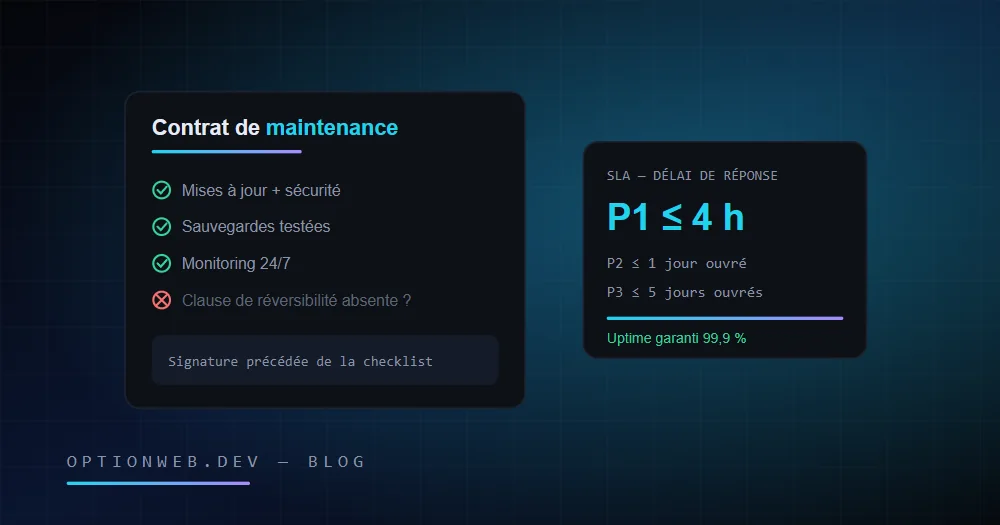
A website maintenance contract must cover six specific areas: technical updates, backups, security, monitoring, support with guaranteed response times (SLAs), and an exit clause at the end of the contract. Any contract that stays vague on one of these six points exposes your SME to nasty surprises: a site down with no recourse, lost data, or a provider holding your access credentials hostage.
Julien Daniel, founder of OptionWeb, reviews dozens of maintenance contracts brought in by Belgian clients every year. The pattern never changes: most disputes are not about price but about missing clauses. This guide gives you the complete review grid: what a contract must contain, the response times to demand, the traps to watch for, and a checklist to run through before you sign.
1. What should a website maintenance contract cover in 2026?
A serious website maintenance contract covers three families of services: preventive maintenance (updates, backups, monitoring), corrective maintenance (fixing bugs and incidents) and support (answering your requests, small changes). Each family must be described with concrete deliverables and a frequency: “monthly update” is a commitment, “regular follow-up” is not.
- Preventive maintenance — Updates to the CMS, extensions and dependencies; automated and tested backups; SSL certificate renewal; uptime and performance monitoring.
- Corrective maintenance — Bug fixes, bringing the site back online after an outage, cleanup after a hack, restoring from backup. This is where SLAs (guaranteed response times) really matter.
- Support and small evolutions — Content changes, adding a page, answering your questions. The contract specifies the included volume (in hours or tickets per month) and the rate beyond it.
- Cross-cutting obligations — Confidentiality, GDPR compliance as a data processor (Article 28), periodic reporting, and an exit clause at the end of the contract.
The scope generally excludes graphic redesigns, major development work and SEO. That is normal: those services belong in separate quotes. What is not normal is a contract that excludes bringing the site back online after an incident, or restoring a backup: those two services are the very core of maintenance.
2. Why does an unmaintained website become a risk?
An unmaintained site becomes vulnerable within months, not years. CMSs and their extensions ship security patches continuously; failing to apply them leaves publicly documented doors open, which bots exploit automatically.
The numbers are stubborn. Patchstack recorded more than 7,000 new vulnerabilities in the WordPress ecosystem over 2024, the vast majority of them in third-party plugins. According to Sucuri's annual reports, roughly 9 out of 10 hacked sites among those analysed were running an outdated CMS at the time of infection. And on the visitor side, Google measured that 53% of mobile users abandon a page that takes more than 3 seconds to load: a site that degrades costs you revenue before it even goes down.
The risk is also legal. A site that collects data (contact form, newsletter, e-commerce) must remain GDPR-compliant over time: up-to-date cookie libraries, accurate notices, documented processors. A data breach caused by an unpatched site engages the company's liability, not the visitor's. We cover this in detail in our guide to GDPR compliance for websites in 2026.
3. Which clauses should a good contract contain?
Eight clauses separate a protective contract from a decorative one: a detailed scope, quantified SLAs, backups with a stated retention period, security, intellectual property, exit terms, duration and termination, and liability. The table below sums up why each one is critical and the warning sign that should make you react.
| Clause | Why it is critical | Red flag |
|---|---|---|
| Scope of services | Defines what is included, excluded, and billable on top. It is the basis of every future dispute. | Vague wording: “regular follow-up”, “general maintenance”, with no frequency or deliverable. |
| SLAs (guaranteed response times) | Without a written deadline, “we're on it” can mean a week with your site offline. | No quantified deadlines, or deadlines in “business days” for a site that is down. |
| Backups | The only real protection against hacking, human error and server failure. | Unspecified frequency, no mention of restore testing, backups stored on the same server as the site. |
| Security and updates | Unapplied patches are the number one cause of SME website hacks. | Updates “at the client's request”: that is the world upside down. |
| Intellectual property | Determines whether you can leave with your site, your code and your content. | Total silence on ownership, or a usage licence instead of an assignment. |
| Exit terms | Guarantees the return of access credentials, code and data at the end of the contract. | No clause at all, or a handover billed at a deterrent rate. |
| Duration and termination | Frames the commitment and the way out. Flexibility is a sign the provider is confident. | A 24-36 month commitment with automatic renewal and 6 months' notice. |
| Liability and insurance | Specifies who pays what in the event of data loss or prolonged downtime. | A clause exempting the provider from all liability, even in case of fault. |
A well-drafted clause is verifiable: it contains a number, a frequency or a deliverable. “Daily backup, 30-day retention, quarterly restore test” is a clause. “Regular backups” is a line from a brochure.
Ownership of code and access: the most neglected point
In Belgium as in France, a website's code is protected by copyright: without a written assignment, it remains the developer's property. The maintenance contract must therefore guarantee, at a minimum, that you hold or will receive: the site's admin access, the hosting access, management of the domain name in your name (you must be the registered holder, not the provider) and a usable copy of the code and the database. A provider who registers your domain in its own name creates a dependency you will pay dearly for the day you leave.
4. What is an SLA and which response times should you demand?
An SLA (Service Level Agreement) is the provider's written commitment on two distinct timeframes: the response time (when someone picks up your request) and the resolution time (when the problem is fixed). A serious SLA classifies incidents by priority, because a site that is down and a typo do not call for the same urgency.
The standard classification uses three priority levels. P1 is a blocking incident: site unreachable, hack, broken payments on an e-commerce store. P2 is a major but workaroundable incident: broken form, important page in error. P3 covers minor requests: cosmetic bug, question, small change.
| Priority | Concrete example | Response time to demand | Reasonable resolution time |
|---|---|---|---|
| P1 — Critical | Site down, hack, broken checkout flow | 1 hour (business hours), 4 h maximum outside business hours with a 24/7 option | 4 to 8 hours |
| P2 — Major | Contact form down, product page returning a 500 error | 4 business hours | 1 to 2 business days |
| P3 — Minor | Display bug, change request, question | 1 business day | 3 to 5 business days |
Check three details that change everything. One: do the deadlines run in business hours or calendar hours? A P1 SLA of “within 8 business hours” means an outage at 6 p.m. on Friday can wait until Monday. Two: what happens if the SLA is missed? Without a penalty (credit note, partial refund), an SLA is a promise without consequences. Three: the channel matters: an SLA that only starts after a ticket on some obscure platform is weaker than one triggered by email or phone.
5. Backups, updates, monitoring: what are the minimum guarantees?
The minimum technical guarantees of a maintenance contract in 2026 are: a daily off-site backup with 30 days' retention, security updates applied within 7 days (24-48 h for critical vulnerabilities), and uptime monitoring with automatic alerts. Below this baseline, you are paying for a contract that does not protect you.
Backups: the 3-2-1 rule
A backup only has value if it can be restored. The 3-2-1 rule remains the benchmark: three copies of the data, on two different media, including one copy off the production server. A backup stored on the same server as the site disappears with it in the event of a disk failure or ransomware.
- Frequency matched to your activity — Daily for a brochure site, several times a day for an e-commerce store where every lost order is a customer dispute.
- Retention stated in the contract — 30 days minimum. A stealthy hack can be discovered weeks after the infection: you must be able to roll back to before it.
- Restore tests — The contract must provide for periodic tests (at least quarterly). A backup that has never been tested is an assumption, not a guarantee.
- A copy retrievable by the client — You must be able to obtain a usable copy of your site and your data on simple request, without exorbitant fees.
Updates and security: frequency is what protects you
The contract must distinguish security updates (to be applied fast, within 24-48 h for a critical, actively exploited vulnerability) from functional updates (which can be scheduled). It must also state that every update is followed by a test: an update that breaks the site without anyone noticing is worse than no update at all. Round it out with the basics: an automatically renewed SSL certificate, a web application firewall if the site runs on a CMS, and periodic vulnerability scans.
Monitoring: who discovers the outage, you or the provider?
Uptime monitoring checks the site at short intervals (1 to 5 minutes) and alerts the provider automatically. It is a simple marker of professionalism, and easy to verify: ask who receives the alert and how fast. If the answer is “let us know if you notice a problem”, the monitoring does not exist: you are the monitoring. A good contract also includes a periodic report: measured uptime, updates applied, backups completed, incidents handled.
6. What are the red flags of a maintenance contract built to trap you?
Trap contracts share a common mechanism: creating a dependency that makes leaving costly or technically impossible. The warning signs can be spotted in ten minutes of reading, provided you know where to look.
- Domain registered in the provider's name — You no longer own your own web address. In a dispute, the provider can literally switch off your online presence.
- No admin access provided — “For your security, we keep the credentials”: the classic line of technical hostage-taking. Your credentials belong to you.
- Long commitment with automatic renewal — 24 or 36 months renewed automatically with 3 to 6 months' notice: the contract is designed so that you miss the exit window.
- SLAs absent or without penalties — “Best efforts” instead of quantified deadlines. In a prolonged outage, you have no contractual leverage.
- Exclusions that hollow out the contract — Hacking excluded, restores billed extra, incidents “of external origin” not covered: nothing is left of what you are paying for.
- Vague billing for out-of-scope work — No written hourly rate for anything beyond the plan: every request becomes a negotiation, and the invoice a surprise.
- Closed proprietary technology — A site built on an in-house tool with no export: when you leave, you start from scratch. Always ask what can be recovered, and in which format.
A single red flag can be negotiated: ask for the clause to be amended before signing. Three or more red flags reveal a business strategy: change provider. The Belgian market offers plenty of serious alternatives; there is no reason to sign a locked-in contract.
7. How do you review a contract before signing?
Review any maintenance contract by working through a ten-point checklist, in order. Each point calls for an answer written into the contract itself: a verbal answer, however reassuring, is worth nothing on the day of an incident. Allow 30 minutes of careful reading; it is the best investment in your web project.
- List what is included: does each service have a frequency and a verifiable deliverable (monthly update, quarterly report, daily backup)?
- List what is excluded: are post-incident recovery and backup restoration definitely included? If hacking is excluded, what does the contract actually cover?
- Check the SLAs: quantified response and resolution times per priority (P1/P2/P3), business or calendar hours, and penalties for missed deadlines.
- Check the backups: frequency, retention (30 days minimum), off-site storage, restore tests, and your right to obtain a copy.
- Check ownership: domain in your name, admin credentials in your possession, assignment or copy of the code, retrievable database.
- Look for the exit clause: complete handover, execution timeframe, cost (free or a reasonable flat fee), usable format.
- Examine duration and exit: initial commitment (12 months maximum for a first collaboration), notice period (1 to 3 months), automatic renewal terms.
- Check the GDPR side: the provider accesses your data, so it is a processor within the meaning of Article 28; a data processing agreement must accompany the contract.
- Clarify out-of-scope work: a written hourly rate, a mandatory quote above a threshold, and what happens to unused included hours (carried over or lost).
- Ask for a client reference: five minutes on the phone with an existing client says more than ten pages of contract.
On the budget side, simply remember that serious maintenance for an SME site most often sits between €40 and €150/month depending on scope and technology, with e-commerce going beyond that. For detailed ranges by site type and what they must include, see our guide to website maintenance costs in 2026: this article focuses on what the contract contains, not on its price.
One last piece of field advice: date and archive the signed version of the contract, its annexes and the scope. According to the Digital Maturity Barometer of the Belgian FPS Economy, more than 8 out of 10 Belgian SMEs have a website; those who go through an incident without a written contract discover too late that sales promises cannot be argued in court.
A maintenance contract is not an administrative formality: it is the document that decides, on the day your site goes down, whether you are back online in 4 hours or in 4 days. Reread yours with this guide in hand. And if you want a second opinion, OptionWeb will review your current contract or send you a maintenance quote within 24 hours: contact@optionweb.dev or +32 491 14 01 01, with in-person meetings available in Charleroi, Namur, Liège, Mons or Brussels.
Read next
Website Maintenance Cost in 2026 (Belgium Pricing)
How much does website maintenance cost in Belgium in 2026? Expect €50 to €400/month depending on complexity. Detailed plans, agency vs freelancer compared.
Belgian web hosting in 2026: the complete guide for SMBs
How to choose a Belgian web host in 2026 — selection criteria, real costs, GDPR compliance, local datacenters, performance. Practical guide by OptionWeb.
GDPR and your website in 2026: compliance guide for European SMEs
Cookies, Consent Mode v2, non-EU transfers, DPO, processing register, retention periods: everything an SME must configure in 2026 to stay GDPR compliant.